
For years, this site's SSL certificate was a paid one. I bought it, renewed it by hand once a year and mounted it as a couple of files in the nginx container that acts as the front door to the blog (if you read the Digital Ocean - Docker post, you already know the setup). It worked, but paying for something that exists for free and, on top of that, having to remember to renew it, was one of those things you know you'll have to change someday.
That day came, and the change was to Let's Encrypt with Certbot. Getting the first certificate is the least of it: there are a thousand tutorials and you have it in ten minutes. What really made me think was the other part: having it renew itself, having nginx notice and, above all, being able to check it without waiting for it to expire. Let me tell you how I set it up and what I learned along the way.
Two ways to give nginx the certificate
Certbot stores its certificates in /etc/letsencrypt, and the most common way you'll see around is to mount that folder in the nginx container and point to /etc/letsencrypt/live/yourdomain.com/fullchain.pem. It works, but it has its downsides:
- nginx sees everything Certbot stores: your Let's Encrypt account key, old certificates, the renewal configuration... Far more than it needs.
- You have to mount the whole folder. If you mount only
live/you get a surprise: inside there are symbolic links pointing to../../archive/, and in the container those links point to nothing. - The nginx configuration ends up tied to how Certbot organizes its files.
I went the other way: a small script, a deploy hook, which Certbot runs every time it renews and which copies only the certificate and its key to an ssl/ folder, the only thing from Certbot that nginx sees. Why? Because I came from a purchased certificate, and nginx already read its files from that folder. With the hook, nginx never even noticed the change: the files are still in the same place, only who puts them there changes. And as a bonus, nginx sees only what it needs, and if I switch certificate providers tomorrow, nginx stays the same.
The price is one more script to maintain (and that can fail, as you'll see). It seemed like a fair deal to me.
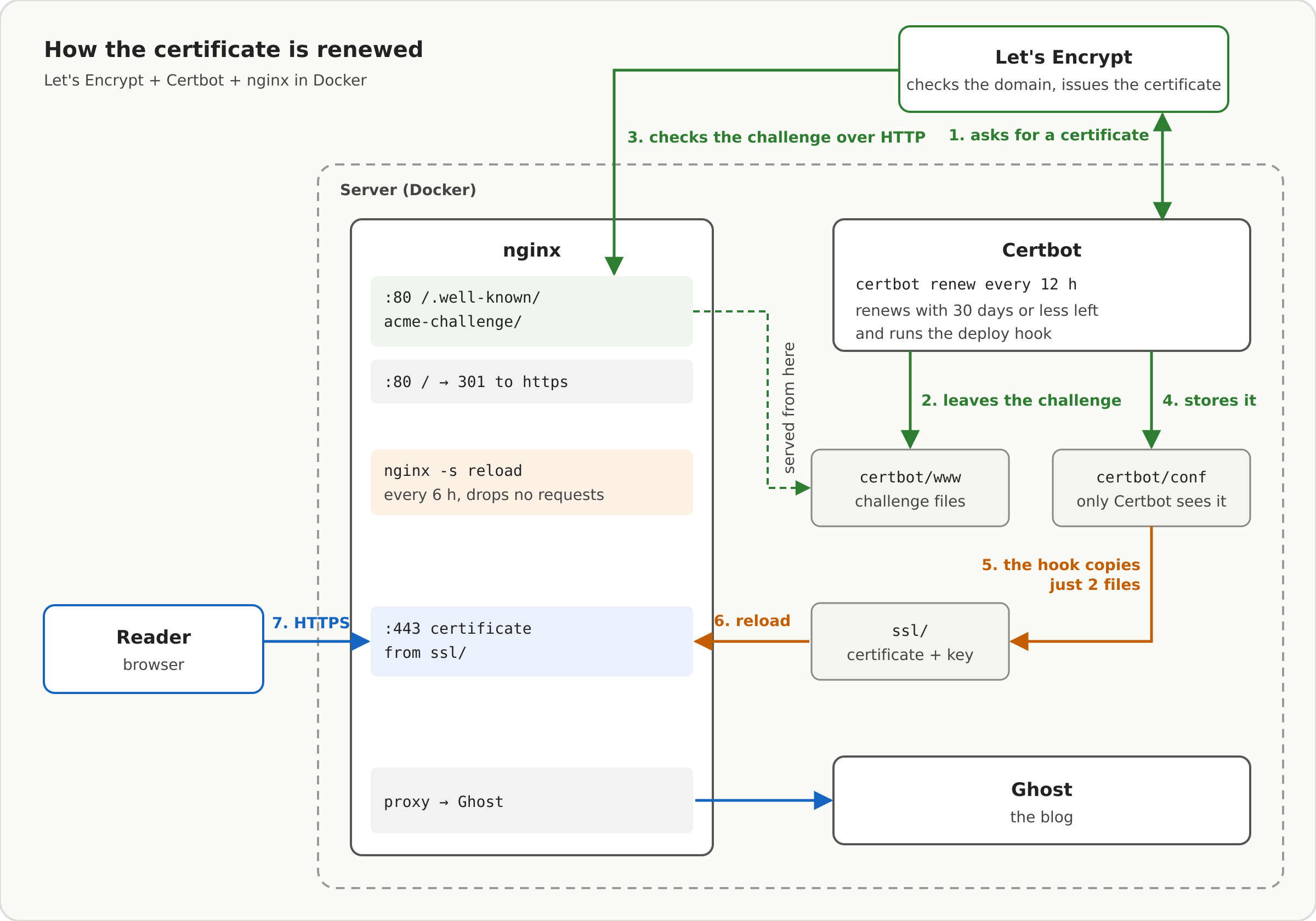
This is the whole circuit, which we'll go through step by step:
The chicken-and-egg problem
To give you a certificate, Let's Encrypt has to verify that the domain is yours. With the webroot method, Certbot leaves a file at a specific path (/.well-known/acme-challenge/...) and Let's Encrypt tries to download it over HTTP. If it finds it, the domain is yours.
So nginx's port 80 block has to serve that path before redirecting everything else to HTTPS:
server {
    listen 80;
    server_name mallotore.com www.mallotore.com;
    server_tokens off;

    location /.well-known/acme-challenge/ {
        root /var/www/certbot;
    }

    location / {
        return 301 https://www.mallotore.com$request_uri;
    }
}
A detail that looks silly and isn't: the redirect goes inside location /. If you put the return 301 directly in the server block, it runs before any location, the challenge path also ends up redirected, and the renewal fails without you noticing until the certificate expires.
The docker-compose
Certbot runs in its own container, with the version pinned (no latest: I don't want an update changing the behavior without me knowing; in my case the version lives in a variables file, CERTBOT_IMAGE_TAG=v5.8.0). It shares the challenge folder with nginx, and has the ssl/ folder and the hook mounted. The compose snippets in this post are the ones from my compose.prod.yaml, trimmed down to what matters:
certbot:
  image: certbot/certbot:${CERTBOT_IMAGE_TAG}
  restart: always
  volumes:
    - "${NGINX_HOST_PATH}/certbot/conf:/etc/letsencrypt"
    - "${NGINX_HOST_PATH}/certbot/www:/var/www/certbot"
    - "${NGINX_HOST_PATH}/ssl:/ssl"
    - "./scripts/letsencrypt/deploy-hook.sh:/usr/local/bin/deploy-hook.sh:ro"
  entrypoint:
    - /bin/sh
    - -c
    - |
      trap exit TERM
      while :; do
        certbot renew --webroot -w /var/www/certbot
        sleep 12h & wait $${!}
      done
Notice that the entrypoint is the renewal loop, not plain certbot. There's more to this than it looks like, as you'll see when it's time to request the first certificate. That loop checks every 12 hours whether it's time to renew. Certbot only really renews when 30 days or fewer are left (certificates last 90), so in practice it renews every two months, but checking often gives you lots of retries if something fails one day.
And here's what almost every tutorial skips: renewing the certificate isn't enough. nginx loads it at startup and keeps it in memory, so it will keep serving the old one until it reloads. If you do nothing, after 90 days your site throws a certificate error... with the new certificate sitting happily on disk. I solve it with a similar loop in nginx, which reloads it every 6 hours:
nginx:
  volumes:
    - "${NGINX_HOST_PATH}/ssl:/etc/nginx/ssl:ro"
    - "${NGINX_HOST_PATH}/certbot/www:/var/www/certbot:ro"
  command:
    - /bin/sh
    - -c
    - |
      while :; do sleep 6h & wait $${!}; nginx -s reload; done & exec nginx -g 'daemon off;'
(I've left out other mounts here, such as nginx.conf or the site configuration. The exec makes nginx replace the shell and receive the container's signals directly.)
The first time I saw it, I wondered whether reloading nginx every 6 hours wouldn't cut off visitors. It doesn't: nginx -s reload is a hot reload. nginx starts new processes with the updated configuration and certificate for new connections, while the old ones finish what they were in the middle of and then close on their own. No request is cut and the site doesn't stop responding for a second. Restarting the container would be a different story: that does leave a few seconds without service.
And why not reload only when there's a new certificate, from the hook itself? Because the hook runs inside the Certbot container, and to notify nginx it would need access to Docker on the server. Giving Certbot that would mean giving it control over all the containers, far more than it needs. Reloading every 6 hours, whether or not there's a new certificate, is less elegant, but it costs nothing and it's quite a bit safer.
The hook
The script is very simple. Certbot passes it the folder of the freshly renewed certificate in RENEWED_LINEAGE, and it copies the two files to /ssl with the names nginx already expected:
#!/bin/sh
set -eu

# Certbot fills in this variable; if it's missing, someone ran the script by hand
: "${RENEWED_LINEAGE:?RENEWED_LINEAGE not set by certbot}"

# The exact names nginx expects; /ssl is where the ssl/ folder is mounted
CHAIN_FILE=/ssl/mallotore_com_chain.crt
KEY_FILE=/ssl/mallotore.key

# cp, not mv: this keeps the same file (inode) that nginx has mounted
cp "$RENEWED_LINEAGE/fullchain.pem" "$CHAIN_FILE"
cp "$RENEWED_LINEAGE/privkey.pem" "$KEY_FILE"
chmod 600 "$KEY_FILE"

echo "deploy-hook: installed new certificate to $CHAIN_FILE and $KEY_FILE"
Two details that aren't obvious. cp instead of mv is a precaution: with a single mounted file, a mv would replace it with a new one that the container wouldn't see (I'll tell you about this trap below). Here I mount the whole folder, so it probably wouldn't happen, but cp costs nothing and saves me from thinking about it. And the chmod 600 is so the private key isn't left readable by anyone, since cp creates the file with the default permissions.
The first certificate
The first time you do have to do it by hand, with the domain's DNS already pointing at the server (otherwise Let's Encrypt can't validate anything). This is the Certbot command, as is:
docker-compose -f compose.yaml -f compose.prod.yaml run -T --rm --entrypoint certbot certbot \
  certonly --webroot -w /var/www/certbot \
  --cert-name mallotore.com -d mallotore.com -d www.mallotore.com \
  --deploy-hook "sh /usr/local/bin/deploy-hook.sh" \
  --agree-tos --no-eff-email -m you@email.com
Two things that took me a while to understand. The first: the --entrypoint certbot. Since the service's entrypoint is the renewal loop, if you run docker-compose run --rm certbot certonly ... as is, those arguments get swallowed by the loop's shell and what you start is the renewal, not the certonly. The second: the --deploy-hook is saved in the renewal configuration, so from then on every renewal runs it on its own. I put sh in front so it doesn't depend on the script having execute permission.
And there's a chicken-and-egg problem inside the chicken-and-egg problem: nginx's port 443 block points to certificate files that don't exist yet, so nginx doesn't even start (and without nginx there's no challenge). On top of that, if you mount a file that doesn't exist, Docker creates a folder in its place. That's why I don't run the command as is, but a script of my own, scripts/letsencrypt/issue-first-cert.sh, which on a new server does this:
- Checks that the Certbot image can be pulled before touching anything.
- If there's already a certificate for that domain, it does nothing (unless you pass
--force). - Creates the folders and backs up whatever was there.
- Generates a one-day self-signed certificate, just so nginx has real files to start with.
- Brings up the containers and runs the command with
--dry-runfirst, and only if it passes, the real one. - Reloads nginx and shows who issues the certificate and when it expires.
You use it like this, and you pass the email yourself (a placeholder here):
scripts/letsencrypt/issue-first-cert.sh --email you@email.com \
  --domain mallotore.com --domain www.mallotore.com
The first --domain is the certificate name.
Testing it without waiting 60 days
This is the part I cared about the most. If the renewal fails, you don't find out for two months, when it's too late. Luckily, Certbot lets you simulate it against Let's Encrypt's test server:
docker exec blog-certbot-1 certbot renew --dry-run --run-deploy-hooks
The --dry-run does the whole process without requesting a real certificate, and --run-deploy-hooks also runs the hook, which is normally skipped in simulations. That way you check the challenge, the permissions and the script all at once.
The first time I ran it, it sat there for several minutes after "Processing...", and I could already see myself hunting for what I'd broken. Looking at the Certbot log, the explanation showed up: when it runs with nobody in front of it, Certbot adds a random wait (I got 270 seconds) so that not every server in the world calls Let's Encrypt at the same time. It wasn't stuck, it was being polite. If you don't want to wait, --no-random-sleep-on-renew skips it.
And one piece of advice: do all your tests with --dry-run. Let's Encrypt has request limits, and a test loop with real certificates can leave your domain blocked for a few days.
Two Docker traps
Along the way I ran into two Docker surprises that have nothing to do with Let's Encrypt, but that can cost you a good while:
- If you mount a file that doesn't exist, Docker creates a folder with that name. If the hook's path is misspelled, Certbot finds an empty folder where it expected a script. That's why, after any change, I check that it's a real file:
docker exec blog-certbot-1 ls -l /usr/local/bin/deploy-hook.sh. - Mounting a single file (like
nginx.conf) ties the container to the original file. If you edit it with some editors, which actually create a new file, the container keeps seeing the old one. After changing it:docker restartthe nginx container.
How I check that everything works
Two commands I now run after any change:
curl -sI http://mallotore.com | head -3     # should redirect (301) to https
openssl s_client -connect www.mallotore.com:443 -servername www.mallotore.com </dev/null 2>/dev/null \
  | openssl x509 -noout -issuer -dates      # who issues it and when it expires
If the expiration date moves forward after a renewal, the whole circuit works: Certbot renewed, the hook copied and nginx reloaded.
To wrap up
I thought the challenge was getting the certificate, and it turned out to be the easy part. What really takes effort is everything that happens afterwards: having it renew itself, having nginx notice, and being able to check it today instead of finding out two months from now with the site down. In the end, it's a script of a few lines, a couple of loops and a --dry-run. But the difference between having it and not having it is the difference between forgetting about the certificate... and the certificate forgetting about you.