
On the team I was on, we had a web application with a good handful of e2e tests in Cypress: user sign-ups, purchases, bookings. Testing what's on screen is the easy part. What's harder is everything that happens around it: what did the test leave in the database? How do I start over with a clean scenario? Where do I get a piece of data the UI never shows me?
We solved it by giving Cypress direct access to the database, SQL Server in our case. No test endpoints built into the application on purpose (the way I see it: it's code that exists only for the tests but ships with the application to production, and somebody has to remember to protect it). I'll tell you how we set it up and what we used it for. The table and column names in the examples are made up; the idea is what matters.
Why you need cy.task
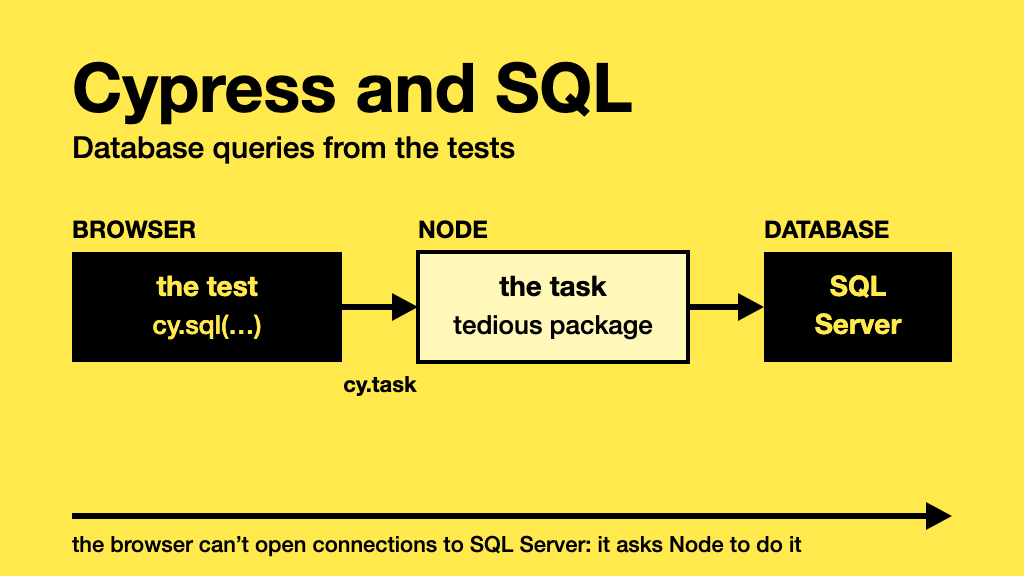
The code of your Cypress tests runs in the browser, and from the browser you can't open a connection to SQL Server. What makes it possible is cy.task: a mechanism for the test to ask Node (the Cypress process running underneath) to run something for it and return the result.
The flow is: the test calls cy.sql, a custom command that calls cy.task internally, which runs in Node, which is the one that actually talks to SQL Server.
Why tedious and not mssql?
We used tedious, which is the SQL Server driver for Node. If you search for how to connect Node to SQL Server, you'll most likely end up at mssql, which is more comfortable (connection pool, promises, typed parameters). But mssql uses tedious under the hood, so what's underneath is the same.
For what we needed, which was one connection and individual queries from the tests, we didn't need a pool. In exchange, tedious is lower level and you have to wrap it yourself, with events instead of promises. It's about forty lines. If you don't feel like writing them, mssql is a perfectly valid option.
npm install --save-dev tedious
One configuration per environment, without the password
Each environment has its own database. In cypress/config/ we had one JSON per environment (in the examples I use dev and staging) with the base URL and the connection details. Everything except the password: that one isn't written in the JSON, it's read from an environment variable.
{
    "baseUrl": "http://app.dev.example.com",
    "env": {
        "id": "dev",
        "db": {
            "server": "localhost",
            "database": "AppDb",
            "user": "cypress",
            "encrypt": true
        }
    }
}
You pick the environment when launching Cypress with --env configFile=staging (with nothing, it uses dev), and the password is passed in from outside:
DB_PASSWORD='<password>' npx cypress run --env configFile=staging
Locally you export it in your terminal, and in CI it comes from the job's secrets. Two details:
- It has to be an environment variable of the Node process (
process.env), not a Cypress one (CYPRESS_...or--env). Cypress ones are reachable from the browser, and the password has no reason to get there. - Having the environment file be the one that says which database to connect to is what keeps you from running a
DELETEwhere you shouldn't.
The task in Node
We used Cypress 9, so the task is registered in cypress/plugins/index.js (from Cypress 10 on it's done in setupNodeEvents, inside cypress.config.js). I've simplified the code we had and added parameters, which is what I would have wanted from the start:
// cypress/plugins/database/sqlClient.js
const { Connection, Request, TYPES } = require('tedious');

let connectionPromise; // a single connection for the whole run

function connect(db) {
    if (connectionPromise) return connectionPromise;

    connectionPromise = new Promise((resolve, reject) => {
        const connection = new Connection({
            server: db.server,
            options: { database: db.database, encrypt: db.encrypt },
            authentication: {
                type: 'default',
                options: { userName: db.user, password: db.password }
            }
        });
        connection.on('connect', error => error ? reject(error) : resolve(connection));
        connection.on('end', () => { connectionPromise = undefined; }); // if it drops, the next call reconnects
        connection.connect();
    }).catch(error => {
        connectionPromise = undefined; // if the connection fails, let the next attempt retry
        throw error;
    });

    return connectionPromise;
}

function typeOf(value) {
    if (typeof value === 'number') return Number.isInteger(value) ? TYPES.Int : TYPES.Float;
    if (typeof value === 'boolean') return TYPES.Bit;
    return TYPES.NVarChar;
}

function executeSql(connection, query, params = {}) {
    return new Promise((resolve, reject) => {
        const rows = [];
        const request = new Request(query, error => error ? reject(error) : resolve(rows));

        Object.entries(params).forEach(([name, value]) => {
            request.addParameter(name, typeOf(value), value);
        });

        request.on('row', columns => {
            const row = {};
            columns.forEach(column => {
                // Id -> id, Email -> email: that way in the tests we write rows[0].id
                const name = column.metadata.colName;
                row[name.charAt(0).toLowerCase() + name.slice(1)] = column.value;
            });
            rows.push(row);
        });

        connection.execSql(request);
    });
}

module.exports = { connect, executeSql };
// cypress/plugins/index.js
const fs = require('fs-extra');
const path = require('path');
const { connect, executeSql } = require('./database/sqlClient');

module.exports = (on, config) => {
    const file = config.env.configFile || 'dev';
    const configFile = fs.readJsonSync(path.resolve('./cypress', 'config', `${file}.json`));

    // The password comes from the process environment, never from the JSON or config.env
    if (!process.env.DB_PASSWORD) {
        throw new Error('The DB_PASSWORD environment variable is missing');
    }
    const db = { ...configFile.env.db, password: process.env.DB_PASSWORD };

    on('task', {
        async sql({ query, params }) {
            const connection = await connect(db);
            return executeSql(connection, query, params);
        }
    });

    return configFile; // that way the environment's baseUrl and env reach Cypress
};
A few details:
- If
DB_PASSWORDis missing, Cypress won't even start, and with a message that says what's missing. Better that than a SQL Server login failure halfway through the run. - A Cypress task can't return
undefined, so it always has to return something. This way aDELETEreturns an empty array and aSELECTreturns the rows. - If the query fails, the task throws the error and the test fails with SQL Server's message. In our original version we caught the error and returned it as the result, and that has a catch: the test carries on as if nothing happened and the failure shows up three steps later, somewhere else. I wouldn't do that again.
- What gets stored is the connection's promise, not the connection: that way, if two queries arrive at the same time, they share the same connection instead of each opening its own. If the connection fails or drops, it's discarded and the next query tries again.
- Column names come out with a lowercase first letter (
Idbecomesid), so you can writerows[0].id. And if you do aSELECT COUNT(*), give it an alias (COUNT(*) AS total): with no column name, SQL Server has nothing to name the key with. - Values go in as parameters (
@email), not concatenated into the query. In a test environment the risk of SQL injection is low, but as soon as a test email has a single quote in it, the concatenated query blows up. In our original version we did concatenate.
The cy.sql command
In cypress/support/commands.js we added the wrapper, which is no more than a nice facade over the task:
Cypress.Commands.add('sql', (query, params = {}) => {
    return cy.task('sql', { query, params });
});
It looks like very little, but it's what makes the tests read like what they are, and not like a pile of plumbing. The name of the task and how to call it live in a single place.
How we used it from the tests
The tests didn't have loose queries in them. Each domain had a file of shared functions, with the query inside and a name that says what it does. That way, in the test you read customerHelper.deleteRegisteredCustomer(email) and not a stray DELETE.
Cleaning up what the test created. The most frequent case. Each sign-up leaves rows in several tables, and the test deletes them when it finishes:
function deleteRegisteredCustomer(email) {
    // Children first, then parents, or the foreign keys won't let you delete
    cy.sql(`
        DELETE FROM Memberships
        WHERE CustomerId IN (SELECT Id FROM Customers WHERE Email = @email)`, { email });
    cy.sql('DELETE FROM Customers WHERE Email = @email', { email });
}
We did it in two steps: first we looked up the id of the parent row, which isn't on any screen, and then we deleted the children with that id. With a subquery like the one above, you save the round trip.
Getting catalog data. Some tests needed the id of an item that depends on how the environment is loaded. Instead of hardcoding it in the test, we ask for it:
function getCatalogItemId(sku, warehouse) {
    return cy
        .sql('SELECT Id FROM CatalogItems WHERE Sku = @sku AND Warehouse = @warehouse', { sku, warehouse })
        .then(rows => rows.length >= 1 ? rows[0].id : null);
}
Leaving the scenario in a known state. This is the one I liked the most. There are things the test itself consumes: the spots of a booking, the stock of a product... If you don't reset it, the test passes the first time and fails the second, because there's no room left. Before each test we restored the state with an UPDATE:
function resetSlotAvailability(slotId) {
    cy.sql('UPDATE ServiceSlots SET Capacity = @capacity, Booked = 0 WHERE Id = @slotId',
        { capacity: 10, slotId });
}
This is exactly what you can't do from the UI: nobody is going to log into a back office to empty the bookings before every run.
And this is what a test looked like
To see it all together, this is the outline of one of our sign-up tests, with the data replaced by made-up data (the application, the routes and the selectors are not the real ones):
import customerHelper from '../../support/context/customers/sharedFunctions';

describe('customers - membership sign up', { retries: { runMode: 1, openMode: 0 } }, () => {

    let email;

    before(() => {
        email = `customer-${Date.now()}@example.com`;
    });

    beforeEach(() => {
        cy.visit('/membership');
    });

    afterEach(() => {
        customerHelper.deleteRegisteredCustomer(email);
    });

    ['monthly', 'yearly'].forEach(plan => {
        it(`customer signs up to the ${plan} plan`, () => {
            cy.get(`[data-cy=${plan}PlanButton]`).click();
            cy.url({ timeout: 10000 }).should('contain', `/membership/checkout?plan=${plan}`);

            cy.get('[data-cy=signUpEmail]').type(email);
            cy.get('[data-cy=signUpPassword]').type('a-test-password');
            cy.get('[data-cy=signUpButton]').click();

            cy.url().should('contain', '/membership/welcome');
            customerHelper.checkWelcomeEmailWasSent(email);
        });
    });
});
And the helper it uses, in support/context/customers/sharedFunctions.js, is the one from before: the queries live there and the test only sees the name.
function deleteRegisteredCustomer(email) {
    cy.sql(`
        DELETE FROM Memberships
        WHERE CustomerId IN (SELECT Id FROM Customers WHERE Email = @email)`, { email });
    cy.sql('DELETE FROM Customers WHERE Email = @email', { email });
}

// checkWelcomeEmailWasSent: checks the test mailbox, with another Node task

export default { deleteRegisteredCustomer, checkWelcomeEmailWasSent };
Notice three things. The first: the test doesn't even mention SQL, and that's what we were after. The query is inside deleteRegisteredCustomer, and whoever reads the test only sees that the customer who just signed up gets deleted at the end. The second: the email is generated only once, in the before, and shared by all the tests in the suite (and their retries). That's why the afterEach is essential: without it, the second plan would try to sign up with an email that already exists. And the third: the afterEach also runs between the attempts of a failing test, so the retry starts without the leftovers of the previous attempt.
We did the email check with another Node task, separate from the SQL one, that read the test mailbox. That's material for another post.
Cleaning up before and after
Cleanup is what we went back and forth on the most. Deleting at the end of the test what that test created seems like the obvious thing, but if the test fails halfway or the run is cut short (a cancelled CI job, a Ctrl+C), the data stays there.
What we did is what you see in the test above: one unique email per suite and cleanup in afterEach, which runs even if the test failed. And in the purchase tests, we also deleted the user in beforeEach: if the previous run was cut short, the user is still in the database, and the next test starts by cleaning up.
To wrap up
At first it feels a bit daunting for the tests to touch the database directly, and that's understandable: you're coupling the tests to the schema. But the alternative is trusting that what the screen shows is what got saved, or cluttering the application with endpoints just for the tests. One connection, one Node task, a cy.sql command and a handful of well-named functions are enough for the tests to be repeatable, to delete what they dirty and to always start from a known state. And if you can, with the password out of the repository from day one.